Player ESP
Box, health, distance.
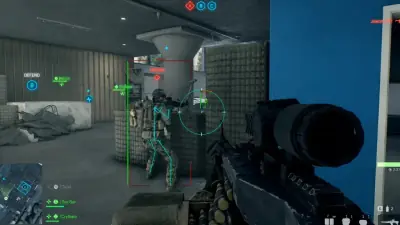
Player ESP marks enemies with a box, name, health bar, skeleton and distance so a contested flag is readable before you leave cover.
- Box and skeleton
- Health bar
- Name and distance
- Max distance filter
- Bot ESP
Battlefield 6 cheats, ESP and aimbot for 64-player Conquest, Breakthrough and REDSEC on PC. Player boxes, vehicle tags, radar, no recoil and no spread sit in one menu.

Listed
Player ESP
Listed
Vehicle ESP
Required
Cloud DMA
24/7
Live support
Features
bf6 cheats lists player ESP, vehicle markers, radar, aimbot with FOV and a visible check, no recoil and no spread for Battlefield 6 on Windows.
Box, health, distance.
Player ESP marks enemies with a box, name, health bar, skeleton and distance so a contested flag is readable before you leave cover.
See past cover.
The same ESP layers keep drawing when a player is behind a wall, rubble or a smoke screen, so you count people you cannot yet shoot.
Bind, FOV, bone.
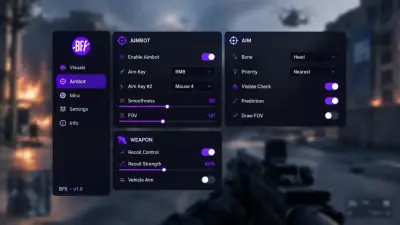
Aimbot uses a custom bind, smoothness, FOV, distance cap, bone selection and a visible check so the correction stays on the shot you already started.
Weapon handling.
No recoil and no spread flatten Battlefield 6 climb and dispersion on their own switches, apart from the aimbot tab.
Tanks, IFVs, air.
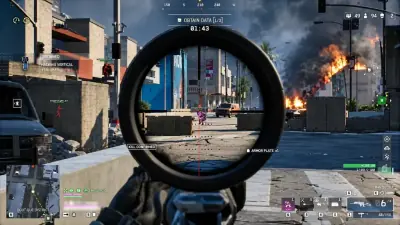
Vehicle markers tag armour and aircraft so an Abrams or a helicopter is a heading, not a surprise on the road to the flag.
Local picture.
Radar is a minimap overlay for the fight you are already in, when you cannot spare a look at world boxes.
Aim FOV.
Draw FOV border and background so the aimbot only corrects inside the circle you set, instead of snapping across a wide Conquest lane.
On-screen reticle.
A crosshair overlay sits on top of the game with style, size and thickness controls, independent of the weapon you are holding.
Save and load.
Save, load, share and delete configs so Conquest, REDSEC and a close map like Vegas Strip do not share one loud profile.
Store
Compare the cheat menu and the utilities on this grid. Open a product page for the feature list and checkout.
Aimbot, player ESP, vehicle ESP, radar, no recoil, and the rest of the listed options.
Aimbot, player ESP, vehicle ESP, radar, wallhack, no recoil and no spread for Battlefield 6.
Disk serials, MAC addresses, and GPU IDs get a new pass. The cleaner in the license runs before the next sign-in.
After a hardware flag, this license rewrites disk serials. It also rewrites MAC addresses, GPU IDs, and related fingerprints. Trace cleanup is in the same license.
A Hyper-V environment for one Windows PC with guided installation and encrypted activation.
Cloud DMA may require GREENWARD, Static Server and AWS as separate purchases. Check the full requirements and current price at checkout.
Weapon skins and outfits, drawn on this PC, without a separate purchase for each cosmetic.
A small client paints premium weapon skins on your screen. Outfits and knife variants are included, across the major titles it lists.
Why us
bf6cheatforge.com lists the current loader status for Battlefield 6. ESP shows players and vehicles. Operators work a 24/7 shift.
Status before you queue
A Battlefield 6 or Javelin patch can change the build. Confirm the current build in the portal before you pay or launch.
Aim and ESP settings
Aimbot exposes bind, FOV, smoothness, bone and a visible check. Player ESP shows box, health and distance. Vehicle markers and radar are separate layers.
Live operators
Engineers handle loader setup, ESP configs, Cloud DMA checks, and HWID resets across a 24/7 shift.
Menu options
Flip each listed option on or off. After a patch, open the menu and see which switches remain.
Compatibility
Battlefield 6 already requires Secure Boot and TPM 2.0. The cheat stack also needs HVCI, Core Isolation and Cloud DMA on supported builds.
HWID reset & license moves
Support handles HWID clears and a move to another PC. Other shops often lock one machine or bill every swap.
Javelin
Anti-cheat context
Battlefield 6 runs EA Javelin with Secure Boot and TPM 2.0 enforced for launch.
24/7
Operator support
People on shift for loader setup, menu configs, and account questions.
4
Listed products
Battlefield 6 Cheats, HWID Spoofer, Cloud DMA, and Skin Changer on bf6cheatforge.com.
Setup guide
The BF6 cheat arrives in the operator portal. Confirm firmware, download the loader, set the menu, then launch Battlefield 6.
Open the portal and download the loader
Launch & configure modules
Verify status & launch Battlefield 6
How it works
Four steps from the operator portal to a profile you can load next time.
4 easy steps
Confirm the current build
After a Battlefield 6 or Javelin update, confirm the current build in the portal before you pay or start the game.
Choose your product
Pick the cheat suite, or a utility when the issue is this PC or an account limit.
Launch & configure
Download the loader from the portal, turn modules on, and set ESP and aim before a live match.
Save your profile
Save the menu profile in the portal so the next session starts from those settings.
Blog
ESP and aimbot setup, firmware checks and Javelin notes for Battlefield 6.
A restricted account is not a restricted machine. Run the test, and if it is the hardware, here is the sequence that clears a flagged PC.
The error says Secure Boot. Half the time Secure Boot is already on and the anti-cheat service simply failed. Here is how to tell them apart.
You can run a battle pass skin without finishing the pass, and nobody else will know. What client side means and where it stops.
FAQ
Answers for this page. The FAQ page holds the rest.