
Battlefield 6 Hacks for Windows
Aimbot controls here are bind, smoothness, bone, FOV and a visible check. Player ESP, vehicle tags and radar sit on their own layers. Confirm the game build on bf6cheatforge.com before you launch.
Product Overview
At a glance
Key capabilities
The short list for Battlefield 6 Cheats, before the full module list.
Another 6 options are in the full list below.
Overview
Battlefield 6 cheat suite
How the listed modules fit a Battlefield 6 match.
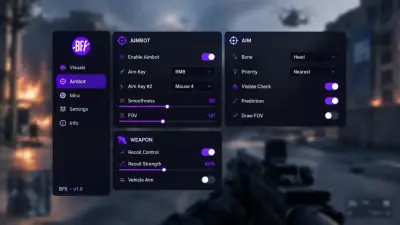
This BF6 cheat lists aimbot with a bind, FOV, smoothness, bone choice and a visible check. Player ESP adds box, skeleton, name, health and distance. Vehicle markers and radar cover the rest of a 64-player flag.
No recoil and no spread sit on their own switches. After a patch, confirm the current build in the portal before you start the game. Cloud DMA is required for full functionality on supported builds.
The listed menu covers aimbot with FOV, smoothness, bone and a visible check, player ESP with box, skeleton, health and distance, plus radar, vehicle markers, no recoil and no spread where those switches are present.
Configuration and support
The menu turns each option on or off and shows the settings that option has. Configs can be saved, loaded, shared or deleted. Setup notes ship in the portal. A patch can change which settings remain.
Checkout and delivery
The checkout page confirms the available access options. The portal provides delivery instructions after purchase. Cloud DMA is required for full functionality on supported builds. Confirm the current build in the portal before a session.
Updates and compatibility
Compatibility can shift after a Battlefield 6 update or a Javelin change. Check the game version and confirm the current build in the portal before you launch.
Modules
What's included
The full option list for Battlefield 6 Cheats. Each line can be switched in the menu.
- Aimbot toggle, bind, smoothness, FOV and distance
- Bone selection (head, neck, body, pelvis)
- Visible check
- Draw FOV border and background
- Player ESP with box, skeleton, snapline, name, health and distance
- Bot ESP and max distance filter
- Vehicle markers and radar
- No recoil and no spread
- Crosshair overlay (style, size, thickness)
- Config save, load, share and delete
- Menu bind, unload bind and FPS limit
- Menu language: English and Chinese
Experience
Menu layers · After checkout
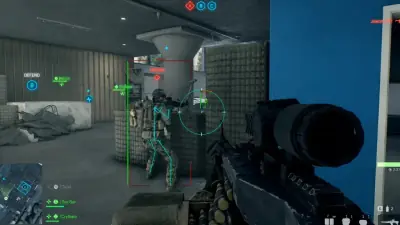
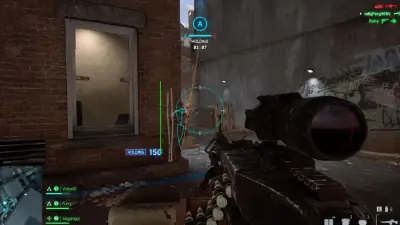
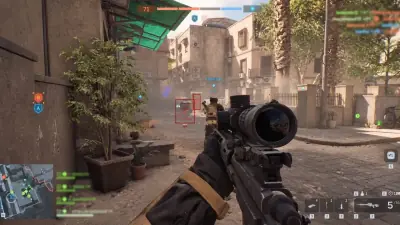
The shots above are the Battlefield 6 menu. The notes below say what each group does, and how the portal opens after checkout.
In-game layers
- Layer A
Match overlays
Player boxes, names, and a skeleton over an enemy holding a doorway.
- Layer B
Aimbot menu
Aim bind, bone, smoothing, FOV, visible check, and recoil strength on the aimbot tab.
- Layer C
ESP overlay
Skeleton, FOV circle, and a holding timer on a close-range flag fight.
- Layer D
Street ESP
A downed player box and a 6 metre tag in a sunlit alley.
- Layer E
Long sightline
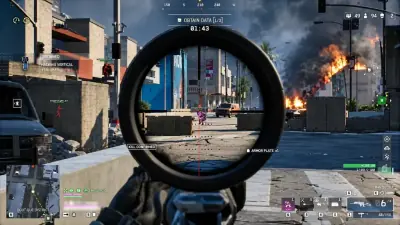
Player markers through a scope on a burning city street.
More products
Pairs well with
Utilities sold beside the cheat. Each one keeps a separate page.
- HWID Spoofer After a hardware flag, this license rewrites disk serials. It also rewrites MAC addresses, GPU IDs, and related fingerprints. Trace cleanup is in the same license. View details: HWID Spoofer
- Cloud DMA Cloud DMA may require GREENWARD, Static Server and AWS as separate purchases. Check the full requirements and current price at checkout. View details: Cloud DMA
- Skin Changer A small client paints premium weapon skins on your screen. Outfits and knife variants are included, across the major titles it lists. View details: Skin Changer
FAQ
Questions about this page
Answers for this page. The FAQ page holds the rest.
Blog
Related guides
Filter by topic to find setup guides, feature deep-dives, and patch-day notes.
Battlefield 6 lobbies are 64 players, vehicles and smoke. Here is what the build shows before you push a flag, and how it is delivered.
Sixty four players produce a lot of markers. Here is how to strip the overlay to the layers that decide a flag, and when radar beats boxes.
Battlefield 6 fights happen at 40 to 150 metres, not 8. Recoil and spread control do most of the work, and the aimbot should be set small.
Battlefield 6 refuses to launch without Secure Boot and TPM 2.0. Get the firmware right first, then follow the install order exactly.
Battlefield 6 was built around a kernel anti-cheat that demands a trusted boot state. What Javelin checks, what it cannot see, and the habits that keep an account alive.
Battlefield 6 community forum
Read discussion
Archived, read-only threads on loader setup, ESP configs, patch status, and HWID bans. Replies are closed.
- Battlefield 6 what does the ESP actually draw in bf6, and what is the radar Beginner explainer. Boxes, distance and vehicle tags get described, the radar is separated out as a different tool, and one person points out that BF6 is too chaotic to read every icon at once.
- Battlefield 6 vehicle esp and vehicle aimbot, is it worth it for a tank main Armour player asks if the vehicle tools are actually useful or just filler. Replies split between the infantry crowd calling it a gimmick and the armour crowd saying it is the whole reason they bought.
- Battlefield 6 aimbot settings that hold up at 200m without looking silly Config thread with a range focus. Small FOV and prediction get recommended, and one person argues chest bone over head for anything past 100m.
- Buying and Delivery monthly vs lifetime, honest answers The subscription argument. People talk about playing in bursts, burnout on big map shooters, and two people admit lifetime has been sitting unused.